ACOL106: Data Structures
(Recap: Python Module 4)
1. Object-oriented programming: Goals and principles
In this module, our focus shifts from basic programming concepts to a programming paradigm that allows executing large projects with many moving parts and actors that interact in complex ways, thus increasing the risk of errors. Note that concepts learnt by the end of Module-2 are sufficient to execute any computational task (as also mentioned earlier, the programming concepts introduced in Module-1 and Module-2 are Turing complete), and hence should be sufficient to execute even large projects. However, once you start coding for executing more elaborate projects using just the basic programming primitives, you realise that managing the code (this includes updating functionality, division of labour, etc.) and debugging (students must have realized by now that it is debugging that costs the most programming effort and time) becomes very difficult.Design Goals
The high-level design goals for implementing large programming projects can be summarised into the following three categories:- Robustness: We want software to be robust, that is, capable of handling unexpected inputs that are not explicitly defined for its application.
- Adaptability: Software should be able to evolve over time in response to changing conditions in its environment. Thus, another important goal of quality software is that it achieves adaptability (also called evolvability). Related to this concept is portability, which is the ability of software to run with minimal change on different hardware and operating system platforms. An advantage of writing software in Python is the portability provided by the language itself.
- Reusability: The same code should be usable as a component of different systems in various applications. Developing quality software can be an expensive enterprise, and its cost can be offset somewhat if the software is designed in a way that makes it easily reusable in future applications.
Object-oriented design principles
Chief among the principles of the object-oriented approach, which are intended to facilitate the goals outlined above, are the following:- Modularity: Modern software systems typically consist of several different components that must interact correctly in order for the entire system to work properly. Keeping these interactions straight requires that these different components be well organized. Modularity refers to an organizing principle in which different components of a software system are divided into separate functional units.
As a real-world analogy, a house or apartment can be viewed as consisting of several interacting units: electrical, heating and cooling, plumbing, and structural. Rather than viewing these systems as one giant jumble of wires, vents, pipes, and boards, the organized architect designing a house or apartment will view them as separate modules that interact in well-defined ways. In so doing, he or she is using modularity to bring a clarity of thought that provides a natural way of organizing functions into distinct, manageable units.
In like manner, using modularity in a software system can also provide a powerful organizing framework that brings clarity to an implementation. In Python, we have already seen that a module is a collection of closely related functions and classes that are defined together in a single file of source code. Python’s standard libraries include, for example, the math module, which provides definitions for key mathematical constants and functions, and the os module, which provides support for interacting with the operating system.
The use of modularity helps support the goals listed earlier. Robustness is greatly increased because it is easier to test and debug separate components before they are integrated into a larger software system. Furthermore, bugs that persist in a complete system might be traced to a particular component, which can be fixed in relative isolation. The structure imposed by modularity also helps enable software reusability. If software modules are written in a general way, the modules can be reused when a related need arises in other contexts. This is particularly relevant in a study of data structures, which can typically be designed with sufficient abstraction and generality to be reused in many applications.
- Abstraction: The notion of abstraction is to distill a complicated system down to its most fundamental parts. Typically, describing the parts of a system involves naming them and explaining their functionality. Applying the abstraction paradigm to the design of data structures gives rise to abstract data types (ADTs). An ADT is a mathematical model of a data structure that specifies the type of data stored, the operations supported on it, and the types of parameters of the operations. An ADT specifies what each operation does, but not how it does it. We will typically refer to the collective set of behaviors supported by an ADT as its public interface. Some of these concepts will be elaborated upon later when we start doing object-oriented programming.
- Encapsulation: Another important principle of object-oriented design is encapsulation. Different components of a software system should not reveal the internal details of their respective implementations. One of the main advantages of encapsulation is that it gives one programmer freedom to implement the details of a component, without concern that other programmers will be writing code that intricately depends on those internal decisions. The only constraint on the programmer of a component is to maintain the public interface for the component, as other programmers will be writing code that depends on that interface. Encapsulation yields robustness and adaptability, for it allows the implementation details of parts of a program to change without adversely affecting other parts, thereby making it easier to fix bugs or add new functionality with relatively local changes to a component.
Object-oriented design facilitates reusable, robust, and adaptable software. Designing good code takes more than simply understanding object-oriented methodologies, however. It requires the effective use of object-oriented design techniques. Computing researchers and practitioners have developed a variety of organizational concepts and methodologies for designing quality object-oriented software that is concise, correct, and reusable.
2. Software Development
Traditional software development involves several phases. Three major steps are:- Design
- Implementation
- Testing and Debugging
3. Class Definitions
A class serves as the primary means for abstraction in object-oriented programming. In Python, every piece of data is represented as an instance of some class. A class provides a set of behaviors in the form of member functions (also known as methods), with implementations that are common to all instances of that class. A class also serves as a blueprint for its instances, effectively determining the way that state information for each instance is represented in the form of attributes (also known as fields, instance variables, or data members).3.1 Example: CreditCard Class
As a first example, we provide an implementation of a CreditCard class. The instances defined by the CreditCard class provide a simple model for traditional credit cards. They have identifying information about the customer, bank, account number, credit limit, and current balance. The class restricts charges that would cause a card’s balance to go over its spending limit, but it does not charge interest or late payments, which we will model later.The construct begins with the keyword class, followed by the name of the class, a colon, and then an indented block of code that serves as the body of the class. The body includes definitions for all methods of the class. These methods are defined as functions, using techniques introduced earlier, yet with a special parameter, named self, that serves to identify the particular instance upon which a member is invoked.
class CreditCard:
    """A consumer credit card"""

    def __init__(self, customer, bank, actn, limit):
        """Create a new credit card instance.
        The initial balance is zero.

        customer the name of the customer (e.g., John Bowman )
        bank the name of the bank (e.g., California Savings )
        acnt the acount identifier (e.g., 5391 0375 9387 5309 )
        limit credit limit (measured in dollars)
        """
        self._customer = customer
        self._bank = bank
        self._account = actn
        self._limit = limit
        self._balance = 0

    def get_customer(self):
        """Return the name of the customer"""
        return(self._customer)

    def get_bank(self):
        """Return the bank's name"""
        return(self._bank)

    def get_account(self):
        """Return the card identifying number (stored as a string)"""
        return(self._account)

    def get_limit(self):
        """Return the current credit limit"""
        return(self._limit)

    def get_balance(self):
        """Return the current balance"""
        return self._balance

    def charge(self, price):
        """Charge given price to the card, assuming sufficient credit limit.
            Return True if charge was processed; False if charge was denied.
        """
        if price+self._balance > self._limit:
            return(False)
        else:
            self._balance += price
            return(True)

    def make_payment(self, amount):
        """Process customer payment that reduces the balance"""
        self._balance -= amount
The self Identifier
In Python, the self identifier plays a key role. In the context of the CreditCard class, there can presumably be many different CreditCard instances (one or a few for every customer), and each must maintain its own balance, its own credit limit, and so on. Therefore, each instance stores its own instance variables to reflect its current state.Syntactically, self identifies the instance upon which a method is invoked. For example, assume that a user of our class has a variable, my_card, that identifies an instance of the CreditCard class. When the user calls my_card.get balance(), identifier self, within the definition of the get_balance method, refers to the card known as my_card by the caller. The expression, self._balance refers to an instance variable, named _balance, stored as part of that particular credit card’s state.
We draw attention to the difference between the method signature as declared within the class versus that used by a caller. For example, from a user’s perspective, we have seen that the get_balance method takes zero parameters, yet within the class definition, self is an explicit parameter. Likewise, the charge method is declared within the class having two parameters (self and price), even though this method is called with one parameter, for example, as my_card.charge(200). The interpreter automatically binds the instance upon which the method is invoked to the self parameter.
The Constructor
A user can create an instance of the CreditCard class using a syntax as:
cc = CreditCard('John Doe', '1st Bank' , '5391 0375 9387 5309' , 1000)
Internally, this results in a call to the specially named __init__ method that serves as the constructor of the class. Its primary responsibility is to establish the state of a newly created credit card object with appropriate instance variables. In the case of the CreditCard class, each object maintains five instance variables, which we name: customer, bank, account, limit, and balance. The initial values for the first four of those five are provided as explicit parameters that are sent by the user when instantiating the credit card, and assigned within the body of the constructor. For example, the command, self._customer = customer, assigns the instance variable self._customer to the parameter customer; note that because customer is unqualified on the right-hand side, it refers to the parameter in the local namespace.
Encapsulation
By the conventions described earlier, a single leading underscore in the name of a data member, such as _balance, implies that it is intended as nonpublic. Users of a class should not directly access such members.As a general rule, we will treat all data members as nonpublic. This allows us to better enforce a consistent state for all instances. We can provide accessors, such as get_balance, to provide a user of our class read-only access to a trait. If we wish to allow the user to change the state, we can provide appropriate update methods. In the context of data structures, encapsulating the internal representation allows us greater flexibility to redesign the way a class works, perhaps to improve the efficiency of the structure.
Additional methods
The most interesting behaviors in our class are charge and make_payment. The charge function typically adds the given price to the credit card balance, to reflect a purchase of said price by the customer. However, before accepting the charge, our implementation verifies that the new purchase would not cause the balance to exceed the credit limit. The make_payment charge reflects the customer sending payment to the bank for the given amount, thereby reducing the balance on the card. We note that in the command, self._balance −= amount, the expression self._balance is qualified with the self identifier because it represents an instance variable of the card, while the unqualified amount represents the local parameter.Error checking
Our implementation of the CreditCard class is not particularly robust. First, we note that we did not explicitly check the types of the parameters to charge and make_payment, nor any of the parameters to the constructor. If a user were to make a call such as visa.charge('candy'), our code would presumably crash when attempting to add that parameter to the current balance. If this class were to be widely used in a library, we might use more rigorous techniques to raise a TypeError when facing such misuse.Beyond the obvious type errors, our implementation may be susceptible to logical errors. For example, if a user were allowed to charge a negative price, such as visa.charge(−300), that would serve to lower the customer’s balance. This provides a loophole for lowering a balance without making a payment. Of course, this might be considered valid usage if modeling the credit received when a customer returns merchandise to a store. We will explore some such issues with the CreditCard class later.
Testing the class
In the following code segment, we demonstrate some basic usage of the CreditCard class, inserting three cards into a list named wallet. We use loops to make some charges and payments, and use various accessors to print results to the console.These tests are enclosed within a conditional, if __name__ == '__main__': so that they can be embedded in the source code with the class definition. These tests provide method coverage, as each of the methods is called at least once, but it does not provide statement coverage, as there is never a case in which a charge is rejected due to the credit limit. This is not a particular advanced form of testing as the output of the given tests must be manually audited in order to determine whether the class behaved as expected. Python has tools for more formal testing (we will see discussion of the unittest module later), so that resulting values can be automatically compared to the predicted outcomes, with output generated only when an error is detected.
if __name__ == '__main__':
    wallet = []
    wallet.append(CreditCard('John Bowman', 'California Savings', '56 5391 0375 9387 5309' , 2500))
    wallet.append(CreditCard('John Bowman', 'California Federal', '58 3485 0399 3395 1954' , 3500))
    wallet.append(CreditCard('John Bowman', 'California Finance', '60 5391 0375 9387 5309' , 5000))

    for val in range(17):
        wallet[0].charge(val)
        wallet[1].charge(2*val)
        wallet[2].charge(3*val)

    for c in range(3):
        print('Customer =' , wallet[c].get_customer())
        print('Bank =', wallet[c].get_bank())
        print('Account =', wallet[c].get_account())
        print('Limit =', wallet[c].get_limit())
        print('Balance =', wallet[c].get_balance())
        while(wallet[c].get_balance() > 100):
            wallet[c].make_payment(100)
            print('New balance = ', wallet[c].get_balance())
        print()

    # Try accessing the nonpublic data member balance
    print(wallet[0]._balance)
    wallet[0]._balance += 100
    print(wallet[0]._balance)
    # We observe that it is not enforced strictly
Customer = John Bowman
Bank = California Savings
Account = 56 5391 0375 9387 5309
Limit = 2500
Balance = 136
New balance =  36

Customer = John Bowman
Bank = California Federal
Account = 58 3485 0399 3395 1954
Limit = 3500
Balance = 272
New balance =  172
New balance =  72

Customer = John Bowman
Bank = California Finance
Account = 60 5391 0375 9387 5309
Limit = 5000
Balance = 408
New balance =  308
New balance =  208
New balance =  108
New balance =  8

36
136
3.2 Operator Overloading and Python’s Special Methods
Python’s built-in classes provide natural semantics for many operators. For example, the syntax a + b invokes addition for numeric types, yet concatenation for sequence types. When defining a new class, we must consider whether a syntax like a + b should be defined when a or b is an instance of that class.By default, the + operator is undefined for a new class. However, the author of a class may provide a definition using a technique known as operator overloading. This is done by implementing a specially named method. In particular, the + operator is overloaded by implementing a method named add, which takes the right-hand operand as a parameter and returns the result of the expression. That is, the syntax, a + b, is converted to a method call on object a of the form, a.__add__(b). Similarly, specially named methods exist for other operators. The Table below provides a comprehensive list of such methods.
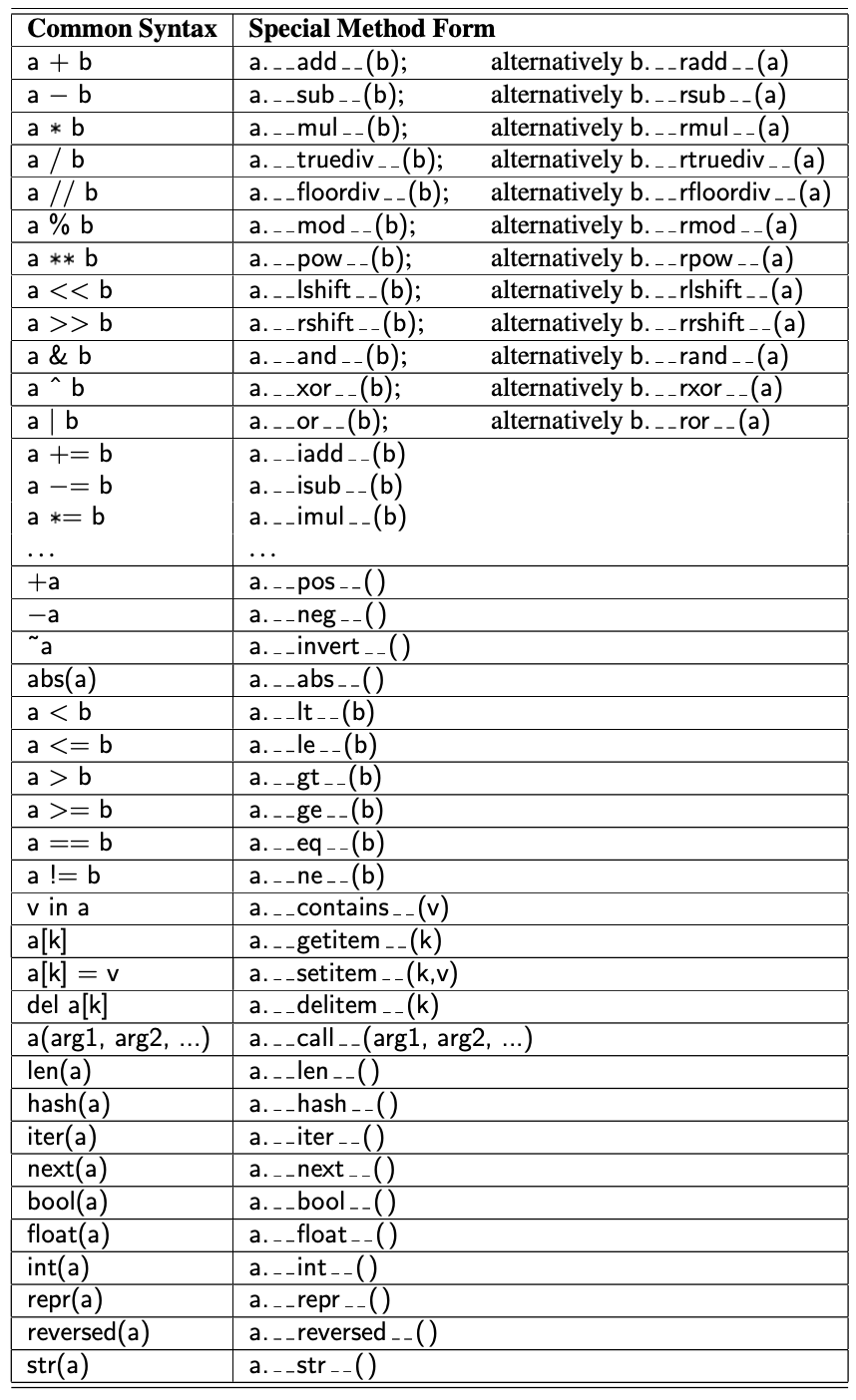
When a binary operator is applied to two instances of different types, as in 3'love me', Python gives deference to the class of the left operand. In this example, it would effectively check if the int class provides a sufficient definition for how to multiply an instance by a string, via the __mul__ method. However, if that class does not implement such a behavior, Python checks the class definition for the right-hand operand, in the form of a special method named __rmul__ (i.e., “right multiply”). This provides a way for a new user-defined class to support mixed operations that involve an instance of an existing class (given that the existing class would presumably not have defined a behavior involving this new class). The distinction between __mul__ and __rmul__ also allows a class to define different semantics in cases, such as matrix multiplication, in which an operation is noncommutative (that is, A\x may differ from x*A).
Non-operator overloads
In addition to traditional operator overloading, Python relies on specially named methods to control the behavior of various other functionality, when applied to user-defined classes. For example, the syntax, str(foo), is formally a call to the constructor for the string class. Of course, if the parameter is an instance of a user-defined class, the original authors of the string class could not have known how that instance should be portrayed. So the string constructor calls a specially named method, foo.__str__(), that must return an appropriate string representation.Similar special methods are used to determine how to construct an int, float, or bool based on a parameter from a user-defined class. The conversion to a Boolean value is particularly important because the syntax, if foo:, can be used even when foo is not formally a Boolean value. For a user-defined class, that condition is evaluated by the special method foo.__bool__().
Several other top-level functions rely on calling specially named methods. For example, the standard way to determine the size of a container type is by calling the top-level len function. Note well that the calling syntax, len(foo), is not the traditional method-calling syntax with the dot operator. However, in the case of a user-defined class, the top-level len function relies on a call to a specially named len method of that class. That is, the call len(foo) is evaluated through a method call, foo.__len__(). When developing data structures, we will routinely define the len method to return a measure of the size of the structure.
Implied methods
As a general rule, if a particular special method is not implemented in a user-defined class, the standard syntax that relies upon that method will raise an exception. For example, evaluating the expression, a + b, for instances of a user-defined class without __add__ or __radd__ will raise an error.However, there are some operators that have default definitions provided by Python, in the absence of special methods, and there are some operators whose definitions are derived from others. For example, the bool method, which supports the syntax if foo:, has default semantics so that every object other than None is evaluated as True. However, for container types, the __len__ method is typically defined to return the size of the container. If such a method exists, then the evaluation of bool(foo) is interpreted by default to be True for instances with nonzero length, and False for instances with zero length, allowing a syntax such as if waitlist: to be used to test whether there are one or more entries in the waitlist.
We will separately discuss Python’s mechanism for providing iterators for collections via the special method, __iter__. With that said, if a container class provides implementations for both __len__ and __getitem__, a default iteration is provided automatically (using means we describe later). Furthermore, once an iterator is defined, default functionality of __contains__ is provided.
Earlier, we drew attention to the distinction between expression a is b and expression a == b, with the former evaluating whether identifiers a and b are aliases for the same object, and the latter testing a notion of whether the two identifiers reference equivalent values. The notion of “equivalence” depends upon the context of the class, and semantics is defined with the __eq__ method. However, if no implementation is given for __eq__, the syntax a == b is legal with semantics of a is b, that is, an instance is equivalent to itself and no others.
We should caution that some natural implications are not automatically provided by Python. For example, the __eq__ method supports syntax a == b, but providing that method does not affect the evaluation of syntax a != b. (The __ne__ method should be provided, typically returning not (a == b) as a result.) Similarly, providing a __lt__ method supports syntax a < b, and indirectly b > a, but providing both __lt__ and __eq__ does not imply semantics for a <= b.
Example: A Multidimensional Vector Class
To demonstrate the use of operator overloading via special methods, we provide an implementation of a Vector class, representing the coordinates of a vector in a multidimensional space. For example, in a three-dimensional space, we might wish to represent a vector with coordinates ⟨5,−2, 3⟩. Although it might be tempting to directly use a Python list to represent those coordinates, a list does not provide an appropriate abstraction for a geometric vector. In particular, if using lists, the expression [5,−2, 3] + [1, 4, 2] results in the list [5,−2, 3, 1, 4, 2]. When working with vectors, if u = ⟨5,−2, 3⟩ and v = ⟨1, 4, 2⟩, one would expect the expression, u + v, to return a three-dimensional vector with coordinates ⟨6, 2, 5⟩.We therefore define a Vector class, in Code segment below, that provides a better abstraction for the notion of a geometric vector. Internally, our vector relies upon an instance of a list, named coords, as its storage mechanism. By keeping the internal list encapsulated, we can enforce the desired public interface for instances of our class.
class Vector:
    """Represents a vector in a multidimensional space"""

    def __init__(self, d):
        """Create d-dimensional vectors of zeros"""
        self._coords = [0]*d

    def __len__(self):
        """Return the dimension of the vector"""
        return len(self._coords)

    def __getitem__(self, j):
        """Return the j^th coordinate of the vector"""
        return self._coords[j]

    def __setitem__(self, j, val):
        """Set the j^th coordinate to a given value"""
        self._coords[j] = val

    def __add__(self, other):
        """Return the sum of two vectors"""
        if len(self) != len(other):
            raise ValueError('dimensions must agree for sum')
        result = Vector(len(self)) # Create a result vector of zeros
        for j in range(len(self)):
            result[j] = self._coords[j] + other[j] # other[j] uses the __getitem__ method
        return result

    def __eq__(self, other):
        """return True if the vector has all the coordinates same as the other"""
        return self._coords == other._coords

    def __ne__(self, other):
        """return True if the vector differs from the other"""
        return not self == other # This relies on the __eq__ method

    def __str__(self):
        """return the string representation of the vector"""
        return '<' + str(self._coords)[1:-1] + '>'
Let us check the behaviour supported by the Vector class below:
v = Vector(5) #create a 5-dimensional vector initialized to zeros
print(v)
v[1] = 23        # based on use of __setitem__
print(v)
v[-1] = 45
print(v)
print(v[4])
u = v + v
print(u)
total = 0
for coordinate in v:       # implicit iteration via __len__ and __getitem__
    total += coordinate
print(total)
<0, 0, 0, 0, 0>
<0, 23, 0, 0, 0>
<0, 23, 0, 0, 45>
45
<0, 46, 0, 0, 90>
68
We implement many of the behaviors by trivially invoking a similar behavior on the underlying list of coordinates. However, our implementation of __add__ is customized. Assuming the two operands are vectors with the same length, this method creates a new vector and sets the coordinates of the new vector to be equal to the respective sum of the operands’ elements.
It is interesting to note that the class definition, as given in the code segment above, automatically supports the syntax u = v + [5, 3, 10,−2, 1], resulting in a new vector that is the element-by-element “sum” of the first vector and the list instance. This is a result of Python’s polymorphism. Literally, “polymorphism” means “many forms.” Although it is tempting to think of the other parameter of our add method as another Vector instance, we never declared it as such. Within the body, the only behaviors we rely on for parameter other is that it supports len(other) and access to other[j]. Therefore, our code executes when the right-hand operand is a list of numbers (with matching length).
3.3 Iterators
Iteration is an important concept in the design of data structures. An iterator for a collection provides one key behavior: It supports a special method named __next__ that returns the next element of the collection, if any, or raises a StopIteration exception to indicate that there are no further elements.Python also helps by providing an automatic iterator implementation for any class that defines both __len__ and __getitem__. To provide an instructive example of a low-level iterator, the code segment below demonstrates just such an iterator class that works on any collection that supports both __len__ and __getitem__. This class can be instantiated as SequenceIterator(data). It operates by keeping an internal reference to the data sequence, as well as a current index into the sequence. Each time __next__ is called, the index is incremented until reaching the end of the sequence.
class SequenceIterator:
    """An iterator for any Python sequence type"""

    def __init__(self, sequence):
        """create an iterator for the given sequence"""
        self._seq = sequence     # keep a reference to the underlying data
        self._k = -1             # will increment to 0 on first call to next

    def __next__(self):
        """Return the next element, or else raise StopIteration error."""
        self._k += 1             # Advance to the next index
        if self._k < len(self._seq):
            return(self._seq[self._k])     #return the data element
        else:
            raise StopIteration()          #there are no more elements

    def __iter__(self):
        """By convention, an iterator must return itself as an iterator."""
        return self
Let us try the above iterator on a vector instance.
v = Vector(10)
print(v)
v[0], v[1], v[2], v[3], v[4], v[5] = 1, 2, 3, 4, 5, 6
v[6], v[7], v[8], v[9] = 7, 8, 9, 10
print(v)
sequence = SequenceIterator(v)
for i in sequence:
    print(i, end=", ")
<0, 0, 0, 0, 0, 0, 0, 0, 0, 0>
<1, 2, 3, 4, 5, 6, 7, 8, 9, 10>
1, 2, 3, 4, 5, 6, 7, 8, 9, 10,
Example: Range class
As the final example for this section, we develop our own implementation of a class that mimics Python’s built-in range class. Before introducing our class, we discuss the history of the built-in version. Prior to Python 3 being released, range was implemented as a function, and it returned a list instance with elements in the specified range. For example, range(2, 10, 2) returned the list [2, 4, 6, 8]. However, a typical use of the function was to support a for-loop syntax, such as for k in range(10000000). Unfortunately, this caused the instantiation and initialization of a list with the range of numbers. That was an unnecessarily expensive step, in terms of both time and memory usage.The mechanism used to support ranges in Python 3 is entirely different (to be fair, the “new” behavior existed in Python 2 under the name xrange). It uses a strategy known as lazy evaluation. Rather than creating a new list instance, range is a class that can effectively represent the desired range of elements without ever storing them explicitly in memory. To better explore the built-in range class, we recommend that you create an instance as r = range(8, 140, 5). The result is a relatively lightweight object, an instance of the range class, that has only a few behaviors. The syntax len(r) will report the number of elements that are in the given range (27, in our example). A range also supports the __getitem__ method, so that syntax r[15] reports the sixteenth element in the range (as r[0] is the first element). Because the class supports both __len__ and __getitem__, it inherits automatic support for iteration, which is why it is possible to execute a for loop over a range.
At this point, we are ready to demonstrate our own version of such a class. The code segment below provides a class we name Range (so as to clearly differentiate it from built-in range). The biggest challenge in the implementation is properly computing the number of elements that belong in the range, given the parameters sent by the caller when constructing a range. By computing that value in the constructor and storing it as self.length, it becomes trivial to return it from the \_len__ method. To properly implement a call to __getitem__(k), we simply take the starting value of the range plus k times the step size (i.e., for k=0, we return the start value). There are a few subtleties worth examining in the code:
class Range:
    """A class that mimic s the built-in range class."""

    def __init__(self, start, stop=None, step=1):
        """Initialize a Range instance... similar to range"""
        if step == 0:
            raise ValueError('Step cannot be 0')
        if stop is None:              #special case of range(n)
            start, stop = 0, start    #should be treated as if range(0,n)
        # calculate the effective length once
        self._length = max(0, (stop - start + step - 1)//step)

        #need knowledge of start and step (but not stop) to support __getitem__
        self._start = start
        self._step = step

    def __len__(self):
        """return the number of entries in the range"""
        return self._length

    def __getitem__(self, k):
        """Return entry at index k (using standard interpretation if negative)."""
        if k < 0:
            k += len(self)     # attempt to convert negative index
        if not 0 <= k <= self._length:
            raise IndexError('index out of range')

        return self._start + k * self._step

if __name__ == '__main__':
    for i in Range(1, 20, 3):print(i, end=", ")
    i = Range(2, 40, 5)
    print("\n", i[5])
1, 4, 7, 10, 13, 16, 19, 22,
 27