ACOL106: Data Structures
(Recap: Python Module 2)
We continue with our recap of Python programming. In this module, we start our discussion with Control Flow. We shall do a quick recap of conditionals and loops before looking at functions and input/output that will nicely set us up for writing some interesting Python programs. As also told in the previous module, much of the text in this notebook is copied from the book. The advantage of a Jupyter notebook over a textbook is that we have code segments that we can use to experiment while trying to pick up a concept.
1. Control Flow
We review Python’s most fundamental control structures: conditional statements and loops. Common to all control structures is the syntax used in Python for defining blocks of code. The colon (:) character is used to delimit the beginning of a block of code that acts as a body for a control structure. If the body can be stated as a single executable statement, it can technically be placed on the same line, to the right of the colon. However, a body is more typically typeset as an indented block starting on the line following the colon. Python relies on the indentation level to designate the extent of that block of code, or any nested blocks of code within.1.1 Conditionals
Conditional constructs (also known as if statements) provide a way to execute a chosen block of code based on the run-time evaluation of one or more Boolean expressions. In Python, the most general form of a conditional is written as follows:
        if first_condition:
            first_body
        elif second_condition:
            second_body
        elif third_condition:
            third_body
        else:
            fourth_body
Each condition is a Boolean expression, and each body contains one or more commands that are to be executed conditionally. If the first condition succeeds, the first body will be executed; no other conditions or bodies are evaluated in that case.
If the first condition fails, then the process continues in a similar manner with the evaluation of the second condition. The execution of this overall construct will cause precisely one of the bodies to be executed. There may be any number of elif clauses (including zero), and the final else clause is optional. A simple example is given below:
score = 69 # You can change the score to experiment
if 91<=score<=100:
    print("Grade = A")
elif(81<=score<=90):
    print("Grade = A-")
elif (71<=score<=80):
    print("Grade = B")
elif score>=61 and score<=70:
    print("Grade = B-")
elif 51<=score and score<=60:
    print("Grade = C")
elif (41<=score and score<=50):
    print("Grade = C-")
elif(31<=score and score<=40):
    print("Grade = D")
elif(21<=score and score<=30):
    print("Grade = E")
else:
    print("Grade = F")
Grade = B-
1.1 Loops
Python offers two distinct looping constructs. A while loop allows general repetition based upon the repeated testing of a Boolean condition. A for loop provides convenient iteration of values from a defined series (such as characters of a string, elements of a list, or numbers within a given range). We discuss both forms in this section.While Loops
The syntax for a while loop in Python is as follows:
while condition:
            body
As with an if statement, condition can be an arbitrary Boolean expression, and body can be an arbitrary block of code (including nested control structures). The execution of a while loop begins with a test of the Boolean condition. If that condition evaluates to True, the body of the loop is performed. After each execution of the body, the loop condition is retested, and if it evaluates to True, another iteration of the body is performed. When the conditional test evaluates to False (assuming it ever does), the loop is exited and the flow of control continues just beyond the body of the loop. We run a few simple experiments below:
quit_symbol = 'C' # You can treat quit_symbol as input that you can change
n = 10
L = ['B', 'J', 'A', 'F', 'I', 'C', 'E', 'G', 'D', 'H']
j=0
Found = False
while j<n and L[j] != quit_symbol:
    j+=1

print(L[0:j]) #prints all the elements of the list before the quit-symbol
['B', 'J', 'A', 'F', 'I']
For loops
Python’s for-loop syntax is a more convenient alternative to a while loop when iterating through a series of elements. The for-loop syntax can be used on any type of iterable structure, such as a list, tuple, str, set, or dict. Its general syntax appears as follows.
        for element in iterable:
            body # body may refer to element as an identifier
Consider the simple example below:
data = (1, 12, 65, 3, 5, 8, 9, 12, 45)
sum = 0
for val in data:
    sum += val
print("Sum = ", sum)
Sum = 160
The loop body executes once for each element of the data sequence, with the identifier val, from the for-loop syntax assigned at the beginning of each pass to a respective element. It is worth noting that val is treated as a standard identifier. If the element of the original data happens to be mutable, the val identifier can be used to invoke its methods. But a reassignment of identifier val to a new value has no effect on the original data, nor on the next iteration of the loop. See the code below.
data = [['A', 91, 100], ['A-', 81, 90], ['B', 71, 80], ['B-', 61, 70], ['C', 51, 60], ['C-', 41, 50], ['D', 31, 40],
        ['E', 21, 30], ['F', 0, 20]]
# Suppose it was decided to update the grade range of E (25-30) and F (0-24).

# The following code does not get this done. Could you tell why?
for val in data:
    if val[0] == 'E':
        val = ('E', 25, 30)
    if val[0] == 'F':
        val = ('F', 0, 24)
print(data)

# The following code gets this done
for val in data:
    if val[0] == 'E':
        val[1] = 25
        val[2] = 30
    if val[0] == 'F':
        val[2] = 24
print(data)

# The following code, which uses the while loop, also works
j=0
while j<9:
    if data[j][0] == 'E':
        data[j] = ('E', 25, 30)
    if data[j][0] == 'F':
        data[j] = ('F', 0, 24)
    j+=1
print(data)
[['A', 91, 100], ['A-', 81, 90], ['B', 71, 80], ['B-', 61, 70], ['C', 51, 60], ['C-', 41, 50], ['D', 31, 40], ['E', 21, 30], ['F', 0, 20]]
[['A', 91, 100], ['A-', 81, 90], ['B', 71, 80], ['B-', 61, 70], ['C', 51, 60], ['C-', 41, 50], ['D', 31, 40], ['E', 25, 30], ['F', 0, 24]]
[['A', 91, 100], ['A-', 81, 90], ['B', 71, 80], ['B-', 61, 70], ['C', 51, 60], ['C-', 41, 50], ['D', 31, 40], ('E', 25, 30), ('F', 0, 24)]
The for-loop syntax has the advantage of simplicity, as there is no need to manage an explicit index into the list or to make a Boolean loop condition. Furthermore, we can use a for loop in cases for which a while loop does not apply, such as when iterating through a collection, such as a set, that does not support any direct form of indexing. Here is an example.
data = set("Hellooooooo")
for val in data:
    if val == 'e':
        print("The letter \'e\' is present in the set.")
The letter 'e' is present in the set.
Index-based for-loops
The simplicity of a standard for loop over the elements of a list is wonderful; however, one limitation of that form is that we do not know where an element resides within the sequence. In some applications, we need knowledge of the index of an element within the sequence. For example, suppose that we want to know where the maximum element in a list resides.Rather than directly looping over the elements of the list in that case, we prefer to loop over all possible indices of the list. For this purpose, Python provides a built-in class named range that generates integer sequences. In simplest form, the syntax range(n) generates the series of n values from 0 to n-1. Conveniently, these are precisely the series of valid indices into a sequence of length n. Therefore, a standard Python idiom for looping through the series of indices of a data sequence uses the following syntax:
for j in range(n):
In this case, identifier j is not an element of the data—it is an integer. But the expression data[j] can be used to retrieve the respective element. Consider the following example from before:
data = [['A', 91, 100], ['A-', 81, 90], ['B', 71, 80], ['B-', 61, 70], ['C', 51, 60], ['C-', 41, 50], ['D', 31, 40],
        ['E', 21, 30], ['F', 0, 20]]
# Suppose it was decided to update the grade range of E (25-30) and F (0-24).

# The following code gets this done. len(.) returns the length of the list
for j in range(len(data)):
    if data[j][0] == 'E':
        data[j][1] = 25
        data[j][2] = 30
    if data[j][0] == 'F':
        data[j][2] = 24
print(data)
[['A', 91, 100], ['A-', 81, 90], ['B', 71, 80], ['B-', 61, 70], ['C', 51, 60], ['C-', 41, 50], ['D', 31, 40], ['E', 25, 30], ['F', 0, 24]]
Break and Continue Statements
Python supports a break statement that immediately terminates a while or for loop when executed within its body. More formally, if applied within nested control structures, it causes the termination of the most immediately enclosing loop. As a typical example, here is code that determines whether a target value occurs in a data set:data = [['A', 91, 100], ['A-', 81, 90], ['B', 71, 80], ['B-', 61, 70], ['C', 51, 60], ['C-', 41, 50], ['D', 31, 40],
['E', 21, 30], ['F', 0, 20]]
# Suppose we wanted to check whether 'E' grade is included or not
found = False
for item in data:
if item[0] == 'E':
found = True
break
if found:
print("It has been confirmed that the 'E' grade has been defined")
It has been confirmed that the 'E' grade has been defined
Python also supports a continue statement that causes the current iteration of a loop body to stop, but with subsequent passes of the loop proceeding as expected. We recommend that the break and continue statements be used sparingly. Yet, there are situations in which these commands can be effectively used to avoid introducing overly complex logical conditions. Here is an example:
data = [['A', 91], ['A-', 81], ['B', 71], ['B-', 61], ['C', 51], ['C-', 41], ['D', 31], ['E', 21], ['F', 0]]

# Suppose we wanted to change the lower limit for all grades except for B and F
for item in data:
    if item[0] == 'B' or item[0] == 'F':
        continue
    item[1] = item[1]-1

print(data)
[['A', 90], ['A-', 80], ['B', 71], ['B-', 60], ['C', 50], ['C-', 40], ['D', 30], ['E', 20], ['F', 0]]
Now that we understand conditionals and loops in addition to instantiating and using built-in classes, we can start writing programs that do not require any input from the user during execution. There are interesting computational problems that we can practice on that do not require large data sets as inputs or inputs from the user. Let's practice on some of these brain-teaser problems before we equip ourselves with the instructions for reading inputs from the console or a file.
Programming problem 1: Write a Python code in the code space below that prints precisely the following pattern on the console. Please note that your output should match symbol by symbol. You must use loops and conditionals. Please do not give a dumb solution with 15 print statements.
       *
      ***
     *****
    *******
   *********
  ***********
 *************
***************
 *************
  ***********
   *********
    *******
     *****
      ***
       *
# Write and test your Python code for programming problem 1 below

# The following version of the print statement may be useful for this problem
# The extra parameter end = '' tells the print routine not to print a newline after *
print("*", end = '') # This does not print a newline after *
print("@") # This adds a newline after @
print() # This simply prints a newline
print('#')
*@

#
Programming problem 2: Write a Python code in the code space below that prints precisely the following pattern on the console. Please note that your output should match symbol by symbol. You must use loops and conditionals. Please do not give a dumb solution with 15 print statements.
       @
      @ @
     @   @
    @     @
   @       @
  @         @
 @           @
@             @
 @           @
  @         @
   @       @
    @     @
     @   @
      @ @
       @
# Write and test your Python code for programming problem 2 below
Programming problem 3: Modify the Python code in the code space below that prints precisely the following checkerboard pattern on the console. Please note that your output should match symbol by symbol. For this question, you are asked to modify the expression within the if statement to obtain the pattern.
***   ***   ***   ***
***   ***   ***   ***
***   ***   ***   ***
   ***   ***   ***
   ***   ***   ***
   ***   ***   ***
***   ***   ***   ***
***   ***   ***   ***
***   ***   ***   ***
   ***   ***   ***
   ***   ***   ***
   ***   ***   ***
***   ***   ***   ***
***   ***   ***   ***
***   ***   ***   ***
   ***   ***   ***
   ***   ***   ***
   ***   ***   ***
***   ***   ***   ***
***   ***   ***   ***
***   ***   ***   ***
# Code for programming problem 3
for i in range(21):
    for j in range(21):
        if(False): # Replace False with an expression to obtain the checkerboard pattern
            print('*', end='')
        else:
            print(' ', end='')
    print()
2. Simple Input and Output
2.1 Console Input and Output
The print function
The print function can be customized through the use of the following keyword parameters.- By default, the print function inserts a separating space into the output between each pair of arguments. The separator can be customized by providing a desired separating string as a keyword parameter, sep. For example, colon-separated output can be produced a print(a, b, c, sep =':'). The separating string need not be a single character; it can be a longer string, and it can be the empty string, sep='', causing successive arguments to be directly concatenated.
- By default, a trailing newline is output after the final argument. An alternative trailing string can be designated using a keyword parameter, end. Designating the empty string end = '' suppresses all trailing characters.
- By default, the print function sends its output to the standard console. However, output can be directed to a file by indicating an output file stream (we will discuss this soon) using file as a keyword parameter.
a=1; b=2; c=3
print(a, b, c, "Testing", sep=':')

print(a, b, sep=';', end=':\n')
print(c)
1:2:3:Testing
1;2:
3
The input function
The primary means for acquiring information from the user console is a built-in function named input. This function displays a prompt, if given as an optional parameter, and then waits until the user enters some sequence of characters followed by the return key. The formal return value of the function is the string of characters that were entered strictly before the return key (i.e., no newline character exists in the returned string).When reading a numeric value from the user, a programmer must use the input function to get the string of characters, and then use the int or float syntax to construct the numeric value that the character string represents. That is, if a call to
year = int(input('In what year were you born? '))
Because input returns a
    reply = input('Enter x and y, separated by spaces: ')
    pieces = reply.split( ) # returns a list of strings, as separated by spaces
    x = float(pieces[0])
    y = float(pieces[1])
reply = input('Enter x and y, separated by spaces: ')
pieces = reply.split() # returns a list of strings, as separated by spaces
x = float(pieces[0])
y = float(pieces[1])
print("x=", x)
print("y=", y)
Let's use the input and print functions to write a useful program that calculates the CGPA as per institute rules.
print("Welcome to the GPA calculator")
print('Please enter all grades, one per line', end='. ')
print("Enter a blank line to indicate the end\n")

points = {'A':10.0, 'A-': 9.0, 'B':8.0, 'B-':7.0, 'C':6.0, 'C-':5.0, 'D':4.0, 'E':2.0, 'F':0.0}

num_courses = 0
total_points = 0.0
done = False

while not done:
    grade = input()
    if grade == '':
        done = True
    elif grade not in points:
        print("Unknown grade '{0}' being ignored".format(grade))
    else:
        num_courses += 1
        total_points += points[grade]
    if num_courses > 0:
        print('Your GPA is {0:.3}'.format(total_points/num_courses))
Programming problem 4: Change the above CGPA calculator so that the CGPA is not printed after entering every grade, but is printed only at the very end.
Programming problem 5: The IITD-AD CGPA calculation computes the weighted average (instead of just the average), where the weights are the credits for courses. Please change the above CGPA calculator that takes as input the grade as well as the number of credits in each course, and outputs the CGPA when all the information has been entered.
2.2 Input and output using Files
Files are typically accessed in Python beginning with a call to a built-in function, named open, that returns a proxy for interactions with the underlying file. For example, the command,The open function accepts an optional second parameter that determines the access mode. The default mode is
When processing a file, the proxy maintains a current position within the file as an offset from the beginning, measured in number of bytes. When opening a file with mode
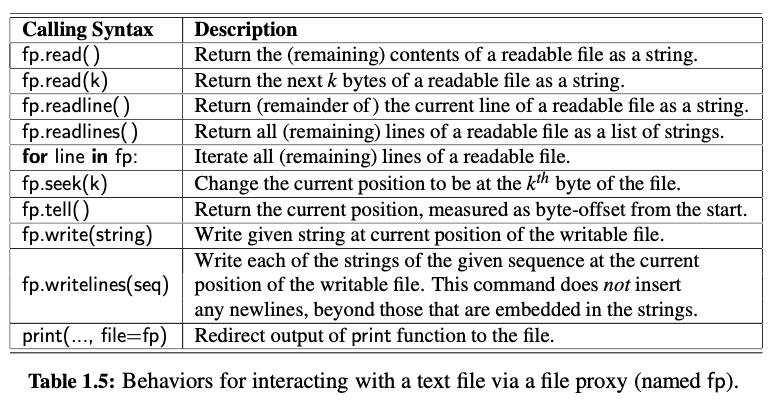
Reading from a File
The most basic command for reading via a proxy is the read method. When invoked on file proxyWriting to a File
When a file proxy is writable, for example, if created with access modeLet's work on a few programming problems to learn how to read and write to files.
Programming problem 6: You are given a matrix in a CSV file (CSV stands for comma-separated values). The rows are given in lines of the file, and row values are comma-separated. For example, here are the contents of a file containing the information of a 2x3 matrix:
        1, 3, 8
        6, 3, 2
You are asked to write a Python program that reads from the input file 'matrix.csv' and writes the transpose of the matrix to a file 'matrix_output.csv.' To help you, we have given how to transpose a matrix specified as a list of lists.
A =[[1, 3, 8], [6, 3, 2]]
# The above list represents a 2x3 matrix. The expected output is [[1, 6], [3, 3], [8, 2]]

n = len(A)
m = len(A[0])

B = []
for j in range(m):
        L = []
        for i in range(n):
            L.insert(i, A[i][j])
        B.insert(j, L)

print(B)
Programming problem 7: Read matrix A from file 'A.csv' and matrix B from 'B.csv', and write the product matrix AxB to the file 'C.csv'. You may assume that the matrices are compatible for taking the product.
3. Module Endnote
This module was to equip you with the minimal set of Python programming concepts that are sufficient for you to write a program for any computational task (very soon in your CSE program, you will learn that the set of programming concepts in Module-1 and Module-2 form a Turing-complete set, which means that you can write a program to compute any function that is computable). This means that you are all set to participate in programming challenges set up on Gradescope. We shall communicate regarding these challenges separately on Piazza.Starting from the next module, the discussion will be all about programming conveniences and concepts that allow organising and managing your programs better. Better organization and management become extremely important for large programs (or more appropriately, programming projects) with many moving parts and more than one programmer contributing to the program.