 "
]
},
{
"cell_type": "markdown",
"id": "f6e367e7-e139-4289-8d84-bd8b0e94aac8",
"metadata": {},
"source": [
"There are rules for what could be a valid identifier, and students should look this up. In short, most combinations of letters, numerals, and underscores that do not start with a numeral should be a valid identifier.\n",
"\n",
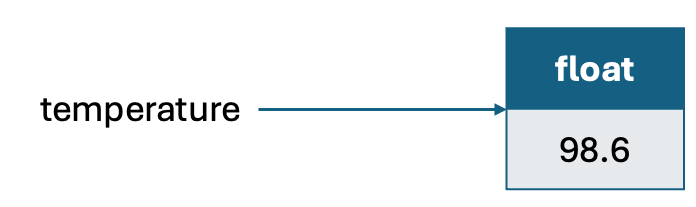
"An interesting property of the Python programming language is that we do not need to define the \"type\" of an identifier before assigning an object to it. In other languages, such as Java or C++, we must first define the type of an identifier before assignment. For example, a similar assignment statement in Java will be float temperature = 98.6. This is because Python is a dynamically typed language. This means that the same identifier can be used to reference a different type of object. For example, see the code below."
]
},
{
"cell_type": "code",
"execution_count": 4,
"id": "cdd89871-2df0-41f6-a953-6fc3c8e37092",
"metadata": {},
"outputs": [
{
"name": "stdout",
"output_type": "stream",
"text": [
"The temperature identifier is of type
"
]
},
{
"cell_type": "markdown",
"id": "f6e367e7-e139-4289-8d84-bd8b0e94aac8",
"metadata": {},
"source": [
"There are rules for what could be a valid identifier, and students should look this up. In short, most combinations of letters, numerals, and underscores that do not start with a numeral should be a valid identifier.\n",
"\n",
"An interesting property of the Python programming language is that we do not need to define the \"type\" of an identifier before assigning an object to it. In other languages, such as Java or C++, we must first define the type of an identifier before assignment. For example, a similar assignment statement in Java will be float temperature = 98.6. This is because Python is a dynamically typed language. This means that the same identifier can be used to reference a different type of object. For example, see the code below."
]
},
{
"cell_type": "code",
"execution_count": 4,
"id": "cdd89871-2df0-41f6-a953-6fc3c8e37092",
"metadata": {},
"outputs": [
{
"name": "stdout",
"output_type": "stream",
"text": [
"The temperature identifier is of type 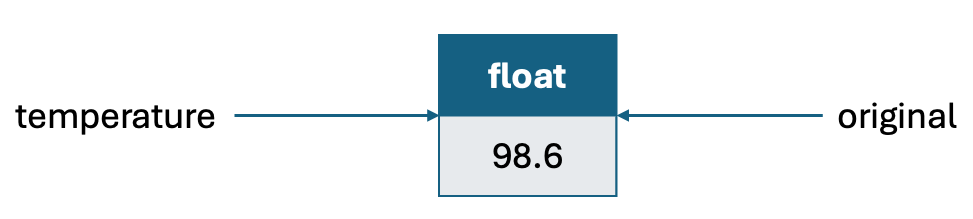 "
]
},
{
"cell_type": "markdown",
"id": "02db691d-09b0-49e1-9082-fd79ce727583",
"metadata": {},
"source": [
"There is always an identifer to the left of '=' of an assignment statement. To the right of '=', we could have an expression (which includes values such as 98.6 or another identifier). The object that the identifier on the left references depends on how the expression on the right gets evaluated. There are certain rules related to expression evaluation, that we will see soon. Let us see an example to get started:"
]
},
{
"cell_type": "code",
"execution_count": 6,
"id": "48b1dc7e-9794-4dcd-a81b-fe2115b7e9d6",
"metadata": {},
"outputs": [],
"source": [
"temperature = 98.6\n",
"original = temperature\n",
"temperature = temperature + 5"
]
},
{
"cell_type": "markdown",
"id": "22e37116-1006-4656-83cd-ac77095ca19f",
"metadata": {},
"source": [
"What do you think is the result of the above sequence of instructions? Do identifiers temperature and original reference the same object storing value 103.6 at the end of these instructions? This crucially depends on how the expression temperature + 5 is evaluated. It turns out, the value 98.6 associated with the object referenced by temperature is added to the value 5, and a new object is created to store the result 103.6. This new object is assigned to the identifier to the left of '=', which is temperature. So, after these lines temperature references a float object with value 103.6, whereas original continues to reference the object with value 98.6. See diagram below. Add print statements in the code segment above to check for yourself. \n",
"\n",
"
"
]
},
{
"cell_type": "markdown",
"id": "02db691d-09b0-49e1-9082-fd79ce727583",
"metadata": {},
"source": [
"There is always an identifer to the left of '=' of an assignment statement. To the right of '=', we could have an expression (which includes values such as 98.6 or another identifier). The object that the identifier on the left references depends on how the expression on the right gets evaluated. There are certain rules related to expression evaluation, that we will see soon. Let us see an example to get started:"
]
},
{
"cell_type": "code",
"execution_count": 6,
"id": "48b1dc7e-9794-4dcd-a81b-fe2115b7e9d6",
"metadata": {},
"outputs": [],
"source": [
"temperature = 98.6\n",
"original = temperature\n",
"temperature = temperature + 5"
]
},
{
"cell_type": "markdown",
"id": "22e37116-1006-4656-83cd-ac77095ca19f",
"metadata": {},
"source": [
"What do you think is the result of the above sequence of instructions? Do identifiers temperature and original reference the same object storing value 103.6 at the end of these instructions? This crucially depends on how the expression temperature + 5 is evaluated. It turns out, the value 98.6 associated with the object referenced by temperature is added to the value 5, and a new object is created to store the result 103.6. This new object is assigned to the identifier to the left of '=', which is temperature. So, after these lines temperature references a float object with value 103.6, whereas original continues to reference the object with value 98.6. See diagram below. Add print statements in the code segment above to check for yourself. \n",
"\n",
" "
]
},
{
"cell_type": "markdown",
"id": "4273830f-c7b8-4e23-b3da-223eae9c449f",
"metadata": {},
"source": [
"
"
]
},
{
"cell_type": "markdown",
"id": "4273830f-c7b8-4e23-b3da-223eae9c449f",
"metadata": {},
"source": [
"2.2 Creating and using objects
\n", "Since objects and classes are at the core of programming in Python, it is important to have a familiarity with the key concepts to be able to start with basic programming. The full power of object-oriented programming is a separate topic, which we will recap soon. As you must have seen in the ACOL100 course, classes help to encapsulate data and define actions on the data so that a programmer who intends to use the code need not know the details of the inner workings within the class. An object is an instantiation of a class. For example, suppose there is a Student class that is designed to store grades and perform data processing on the grades of a student. We can instantiate an object for every student in the class. To instantiate an object of a class, we invoke the constructor of the class. For example, the Student class may have a constructor that takes as input the name of the student. Then, we can instantiate an object as s1 = Student(\"Ragesh\"). Python's built-in classes (i.e., classes that are pre-defined within Python) support what is known as a literal form for instantiating. The assignment statement we saw earlier: temperature = 98.6 is an example of instantiating a float object using this literal form.\n", "\n", "\n", "\n", "Classes have member functions that are known as methods that are invoked on a specific instance of the class using the dot operator ('.'). For example, the Student may have a method to calculate the CGPA of the student, which can be invoked using the statement s1.calculateCGPA(). Some methods can change the state of the corresponding object (on which the method is called), which are called mutators. Others may only provide access to the state and do not change the state. These are called accessors.\n", "\n", "
2.3 Python's built-in classes
\n", "To start doing basic programming, we must know the basic built-in classes of Python related to various types of data. One of the key concepts when dealing with Python objects is mutability of classes. A class is said to be immutable if the value of any object of the class cannot change after instantiation. For example, float is an immutable object. Classes where the value of the object is allowed to change after instantiation are known as mutable classes. We look at some of the basic built-in classes in Python below. \n", "\n", "The bool class:
This is an immutable class for manipulating Boolean data. There are two literal forms: True and False. There is also a default constructor bool() that instantiates to False. There is also bool(val). When val is a number, then bool(val) instantiates to False when val is 0, and True, otherwise. When val is a string, then bool(val) instantiates to False when val is an empty string, and True, otherwise. See some examples below." ] }, { "cell_type": "code", "execution_count": 9, "id": "63863398-190a-4b70-81fe-8ae308fb8c5c", "metadata": {}, "outputs": [ { "name": "stdout", "output_type": "stream", "text": [ "x, y, z, t: True False False True\n" ] } ], "source": [ "x = True\n", "y = False\n", "z = bool(\"\")\n", "t = bool(90)\n", "print(\"x, y, z, t: \", x, y, z, t)" ] }, { "cell_type": "markdown", "id": "febaee02-7108-41e1-95f4-bfd342b7bab0", "metadata": {}, "source": [ "The int class
\n", "This class is for manipulating integer values with arbitrary magnitude (note that this is unlike in other languages, such as C, C++, where there are different data types for different precisions). The literal forms are values, such as -1, 23, 456785. There is a constructor int() that instantiates to 0. There is also a constructor int(val). When val is a float, then the instantiation is to the truncated value of val. For example, int(3.14) is instantiated to 3 and int(-4.14) is instantiated to 3. When val is a string, then the instantiation is to the integer value of the string. See some examples below. " ] }, { "cell_type": "code", "execution_count": 10, "id": "edec7f5e-0944-457d-91d1-6f94f0e852f7", "metadata": {}, "outputs": [ { "name": "stdout", "output_type": "stream", "text": [ "x, y, z, t, r: 3 0 3 -4 14326\n" ] } ], "source": [ "x = 3\n", "y = int()\n", "z = int(3.14)\n", "t = int(-4.14)\n", "r = int('14326')\n", "print(\"x, y, z, t, r: \", x, y, z, t, r)" ] }, { "cell_type": "markdown", "id": "50e4222c-ef17-42ec-b6f8-3587df92043b", "metadata": {}, "source": [ "The float class
\n", "This is to support operations on floating point numbers (Python supports 64-bit precision adhering to the IEEE 754 standard). Literal forms include simply the values, such as 98.6. Another literal form is 6.022e23 that represents the number 6.022x10²³. Other constructor examples include float() that instantiates to 0.0, float(2) that instantiates to 2.0, float('3.14') that instantiates to 3.14. See some examples below." ] }, { "cell_type": "code", "execution_count": 12, "id": "4dd3051b-0fc3-49bd-acd9-9bf2c026074b", "metadata": {}, "outputs": [ { "name": "stdout", "output_type": "stream", "text": [ "x, y, z, t, r: 2.0 6.022e+23 3.14 2.0 0.0\n" ] } ], "source": [ "x = 2.0\n", "y = 6.022e23\n", "z = float('3.14')\n", "t = float(2)\n", "r = float()\n", "print(\"x, y, z, t, r: \", x, y, z, t, r)" ] }, { "cell_type": "markdown", "id": "64eac07b-abd0-4000-b506-d37a8e5559af", "metadata": {}, "source": [ "The list class
\n", "A list is a mutable class meant to store a sequence of references to arbitrary objects. They are zero-indexed and array-based sequences. The literal form involves using '[]' as delimiters. Some of the examples below should be sufficient to understand the options for constructing a list." ] }, { "cell_type": "code", "execution_count": 22, "id": "a4415426-3955-4d01-8502-5e90b806534f", "metadata": {}, "outputs": [ { "name": "stdout", "output_type": "stream", "text": [ "['red', 'green', 'blue'] [] [1, 3.14, 'red', True] [['red', 'green', 'blue'], [], [1, 3.14, 'red', True]]\n", "[]\n", "['T', 'E', 'S', 'T']\n", "[]\n", "['T', 'e', 's', 't', 'i', 'n', 'g', ' ', 'l', 'i', 's', 't', 's']\n" ] } ], "source": [ "L1 = ['red', 'green', 'blue']\n", "L2 = [] #an empty list\n", "L3 = [1, 3.14, 'red', True]\n", "L4 = [L1, L2, L3]\n", "print(L1, L2, L3, L4)\n", "print(L4[1])\n", "L4[1] = ['T', 'E', 'S', 'T']\n", "print(L4[1])\n", "\n", "#The list() constructor instantiates to an empty list\n", "L5 = list() \n", "print(L5)\n", "\n", "#The list(val) constructor can be given any input of iterable type, such as string, list, dictionary, etc. \n", "L6 = list(\"Testing lists\")\n", "print(L6)" ] }, { "cell_type": "markdown", "id": "0e3f4623-d69b-4bf6-8e16-cb8654a57b9e", "metadata": {}, "source": [ "The tuple class
\n", "This is an immutable version of lists. The literal form uses '()' as delimiters. The examples below should be sufficient to understand the constructions." ] }, { "cell_type": "code", "execution_count": 31, "id": "ab3545b2-fbf6-467e-9377-446f6369329d", "metadata": {}, "outputs": [ { "name": "stdout", "output_type": "stream", "text": [ "3\n", "((), (2,), (2, 3, 'red'))\n" ] } ], "source": [ "T0 = () #an empty tuple\n", "T1 = (2,) #This is a special representation for a tuple with one element since (2) would also represent the number 2\n", "\n", "T2 = (2, 3, 'red')\n", "print(T2[1])\n", "# Try executing T2[1] = 4 to check that tuples are immutable\n", "\n", "# A tuple of tuples\n", "T4 = (T0, T1, T2)\n", "print(T4)\n" ] }, { "cell_type": "markdown", "id": "715ceacf-e9e2-411b-8701-7ea6becb8f78", "metadata": {}, "source": [ "The str class
\n", "Python’s str class is specifically designed to efficiently represent an immutable sequence of characters, based upon the Unicode international character set. The examples below should be self-explanatory: " ] }, { "cell_type": "code", "execution_count": 38, "id": "6abf9d4a-095f-43b7-9b64-894aaf46463c", "metadata": {}, "outputs": [ { "name": "stdout", "output_type": "stream", "text": [ "\n", "\n", "Hello\n", "Hello\n", "Don't worry\n", "Don't worry\n", "A newline\n", "example\n", "A multiline\n", "example using triple \"\n" ] } ], "source": [ "S = '' #An empty string\n", "print(S)\n", "S = \"\" #Another empty string\n", "print(S)\n", "S = \"Hello\"\n", "print(S)\n", "S = 'Hello'\n", "print(S)\n", "S = \"Don't worry\"\n", "print(S)\n", "S = 'Don\\'t worry' # A backslash is used to differentiate the delimiters from characters within the string\n", "print(S)\n", "S = \"A newline\\nexample\"\n", "print(S)\n", "S = \"\"\"A multiline\n", "example using triple \\\"\"\"\"\n", "print(S)" ] }, { "cell_type": "markdown", "id": "6ddd1149-73d1-409c-abce-d85bc25a35e4", "metadata": {}, "source": [ "The set class
\n", "Python’s set class represents the mathematical notion of a set, namely a collection of elements, without duplicates, and without an inherent order to those elements. Note that only instances of immutable types can be\n", "added to a Python set. Python uses curly braces { and } as delimiters for a set. Examples below are self-explanatory:" ] }, { "cell_type": "code", "execution_count": 47, "id": "c8a154f9-c341-4a87-8dac-b28aabe3ad77", "metadata": {}, "outputs": [ { "name": "stdout", "output_type": "stream", "text": [ "set()\n", "{1, 2, 3, 'red'}\n", "{'H', 'o', 'l', 'e'}\n", "{(2, 3), False, 2.13, (2,)}\n" ] } ], "source": [ "S = set() #This instantiates to the empty set. Note that {} does not represent the empty set\n", "print(S)\n", "S = {1, 2, 3, 'red', 2, 1}\n", "print(S)\n", "\n", "# For an iterable parameter as input, the set is initialized with the elements of the input\n", "S = set(\"Hellooooooo\")\n", "print(S)\n", "\n", "# One can create more complex sets\n", "S1 = {(2, 3), False, 2.13, (2,)}\n", "print(S1)\n", "# On the other hand, one cannot create a set containing another set or a list, since sets and lists are mutable\n", "# Try creating a set such as S1 = {S, 1, 2} OR S1 = {[1, 2], 1, 2} to check." ] }, { "cell_type": "markdown", "id": "60dc45f2-39b0-4be5-9970-41b4e89390e2", "metadata": {}, "source": [ "The dict class
\n", "Python’s dict class represents a dictionary, or mapping, from a set of distinct keys to associated values. For example, a dictionary might map from unique course ID numbers to larger records (such as the instructor’s name and prerequisite). Python implements a dict using an almost identical approach to that of a set, but with storage of the associated values. This also means that the dict class is mutable. The literal form includes the use of '{}' as delimiters. See examples below:" ] }, { "cell_type": "code", "execution_count": 56, "id": "efd0bfdb-c675-47a8-8e21-bf7dde5e92ba", "metadata": {}, "outputs": [ { "name": "stdout", "output_type": "stream", "text": [ "{}\n", "{'ACOL100': 'Venkata', 'ACOL106': 'Ragesh'}\n", "{'ACOL100': ('Venkata', 'None'), 'ACOL106': ('Ragesh', 'ACOL100')}\n", "{'ACOL100': ('Venkata', 'None'), 'ACOL106': ('Ragesh', 'ACOL100')}\n" ] } ], "source": [ "D1 = {} #An empty dictionary\n", "print(D1)\n", "\n", "D2 = {'ACOL100': 'Venkata', 'ACOL106': 'Ragesh'}\n", "print(D2)\n", "D2 = {'ACOL100': ('Venkata', 'None'), 'ACOL106': ('Ragesh', 'ACOL100')}\n", "print(D2)\n", "\n", "D3 = dict([('ACOL100', ('Venkata', 'None')), ('ACOL106', ('Ragesh', 'ACOL100'))])\n", "print(D3)" ] }, { "cell_type": "markdown", "id": "29ff4893-fa15-4ee2-89cc-a451db6a8791", "metadata": {}, "source": [ "3. Expressions, operators, and precedence
\n", "Existing values/objects can be combined into larger syntactic expressions using a variety of special symbols and keywords known as operators. The meaning of an operator depends on the type of its operands. For example, when a and b are numbers, the syntax a+b indicates addition, while if a and b are strings, the operator indicates concatenation. In this section, we describe Python’s operators in various contexts of the built-in types." ] }, { "cell_type": "markdown", "id": "f8db3c7f-2af0-4b50-8df8-f32aae4108b7", "metadata": {}, "source": [ "The logical operators
\n", "The following operators are supported on Boolean values: (i) Logical negation: not, (ii) Logical AND: and, (iii) Logical OR: or. See some examples below:" ] }, { "cell_type": "code", "execution_count": 62, "id": "6a249ce9-7a18-48f0-8ac6-03c33c0c7542", "metadata": {}, "outputs": [ { "name": "stdout", "output_type": "stream", "text": [ "Hello 1\n", "Hello 2\n", "Hello 3\n" ] } ], "source": [ "if(not False):\n", " print(\"Hello 1\")\n", "a = True\n", "b = False\n", "if(a or (not b)):\n", " print(\"Hello 2\")\n", "\n", "if(a or b):\n", " print(\"Hello 3\")\n", "\n", "if(b and a):\n", " print(\"Hello 4\")" ] }, { "cell_type": "markdown", "id": "4029682d-3cc9-406a-97a9-aeb26e721b70", "metadata": {}, "source": [ "The equality operators
\n", "Python supports the following operators to test two notions of equality: (i) Same identity: is, (ii) Different identity: is not, (iii) Equivalent: ==, (iv) Not Equivalent: !=. The expression a is b evaluates to True, precisely when identifiers a and b are aliases for the same object. The expression a == b tests a more general notion of equivalence. If identifiers a and b refer to the same object, then a == b should also evaluate to True. Yet a == b also evaluates to True when the identifiers refer to different objects that happen to have values that are deemed equivalent. The precise notion of equivalence depends on the data type. For example, two strings are considered equivalent if they match character for character. Two sets are equivalent if they have the same contents, irrespective of order. In most programming situations, the equivalence tests == and != are the appropriate operators; use of is and is not should be reserved for situations in which it is necessary to detect true aliasing. Here are a few examples to test our understanding. " ] }, { "cell_type": "code", "execution_count": 70, "id": "867bc0b8-a3e0-4edb-8e4a-8c3ead2c6465", "metadata": {}, "outputs": [ { "name": "stdout", "output_type": "stream", "text": [ "Hello 1\n", "Hello 2\n", "Hello 4\n" ] } ], "source": [ "A = [1, 2, 3]\n", "B = A\n", "if(B is A):\n", " print(\"Hello 1\")\n", "if(B == A):\n", " print(\"Hello 2\")\n", "\n", "C = [1, 2, 3]\n", "D = [1, 2, 3]\n", "if(C is D):\n", " print(\"Hello 3\")\n", "if(C == D):\n", " print(\"Hello 4\")" ] }, { "cell_type": "markdown", "id": "9d4ba81a-0f3d-4eef-905d-ff6b9feee82f", "metadata": {}, "source": [ "The comparison operators
\n", "The standard comparison operators <, <=, >, >= are defined on numeric and string types. These operators have expected behaviour for numeric types, and are defined lexicographically and case-sensitively for strings. See a few examples below:" ] }, { "cell_type": "code", "execution_count": 75, "id": "b915ba30-3caf-4f22-b6ed-65bd2e593938", "metadata": {}, "outputs": [ { "name": "stdout", "output_type": "stream", "text": [ "True\n" ] } ], "source": [ "print(\"Ragesh\" < \"ragesh\")" ] }, { "cell_type": "markdown", "id": "f3348ede-a840-427d-8d92-35e77049b6c9", "metadata": {}, "source": [ "The arithmetic operators
\n", "Python supports the following arithmetic operators on numeric types: (i) + addition, (ii)− subtraction, (iii) * multiplication, (iv) / true division, (v) // integer division, (vi) % the modulo operator. There are a few subtle points regarding these operations that students should pick up from the book. See a few examples below:" ] }, { "cell_type": "code", "execution_count": 80, "id": "e498e5c0-2de2-43b5-90d0-f35c7637107c", "metadata": {}, "outputs": [ { "name": "stdout", "output_type": "stream", "text": [ "6\n", "3\n", "-7\n", "-7\n", "2.0\n", "1.919999999999999\n" ] } ], "source": [ "print(27//4)\n", "print(27%4)\n", "print(-27//4)\n", "print(27//-4)\n", "print(8.2//3.14)\n", "print(8.2%3.14)" ] }, { "cell_type": "markdown", "id": "ed3e3d92-885b-4585-87f6-b2c296c612b3", "metadata": {}, "source": [ "The bitwise operators
\n", "Python provides the following bitwise operators for integers: (i) ∼ bitwise complement (prefix unary operator), (ii) & bitwise, (iii) | bitwise or, (iv) ˆ bitwise exclusive-or, (v) << shift bits left, filling in with zeros, (vi) >> shift bits right, filling in with sign bit. See a few examples below that you can further experiment with:" ] }, { "cell_type": "code", "execution_count": 89, "id": "339f1060-6e72-4edc-bda2-dac55d84ef99", "metadata": {}, "outputs": [ { "name": "stdout", "output_type": "stream", "text": [ "3\n", "26\n", "8\n", "13\n", "9\n" ] } ], "source": [ "# The bit representation of 13 is 1101. So the bit representation of 13>>2 should be 11 (i.e., 3 in decimal)\n", "print(13>>2) \n", "\n", "print(13<<1)\n", "print(12 & 9)\n", "print(12 | 9)\n", "print(12 ^ 5)" ] }, { "cell_type": "markdown", "id": "dae1c9d3-a2f1-4732-9d63-acf1baa0c66b", "metadata": {}, "source": [ "The sequence operators
\n", "Each of Python’s built-in sequence types (str, tuple, and list) support the following operator syntaxes:\n", "- \n",
"
- s[j]: element at index j \n", "
- s[start:stop]: slice including indices [start,stop) \n", "
- s[start:stop:step]: slice including indices start, start + step, start + 2 step, . . . , up to but not equalling or stop \n", "
- s + t: concatenation of sequences \n", "
- k*s: shorthand for s + s + s + ... (k times) \n", "
- val in s: containment check \n", "
- val not in s: non-containment check \n", "
\n", "\n", "Because lists are mutable, the syntax s[j] = val can be used to replace an element at a given index. Lists also support a syntax, del s[j], that removes the designated element from the list. Slice notation can also be used to replace or delete a sublist.
\n", "\n", "The notation val in s can be used for any of the sequences to see if there is an element equivalent to val in the sequence. For strings, this syntax can be used to check for a single character or for a larger substring, as with \"amp\" in \"example\". All sequences define comparison operations based on lexicographic order, performing an element-by-element comparison until the first difference is found. For example, [5, 6, 9] < [5, 7] because of the entries at index 1. Therefore, the following operations are supported by sequence types:\n", "
- \n",
"
- s == t: equivalent (element by element) \n", "
- s != t: not equivalent \n", "
- s < t: lexicographically less than \n", "
- s <= t: lexicographically less than or equal to \n", "
- s > t: lexicographically greater than \n", "
- s >= t: lexicographically greater than or equal to \n", "
Operators for sets
\n", "Sets support the following operators:\n", "- \n",
"
- key in s: containment check \n", "
- key not in s: non-containment check \n", "
- s1 == s2: s1 is equivalent to s2 \n", "
- s1 != s2: s1 is not equivalent to s2 \n", "
- s1 <= s2: s1 is subset of s2 \n", "
- s1 < s2: s1 is proper subset of s2 \n", "
- s1 >= s2: s1 is superset of s2 \n", "
- s1 > s2: s1 is proper superset of s2 \n", "
- s1 | s2: the union of s1 and s2 \n", "
- s1 & s2: the intersection of s1 and s2 \n", "
- s1− s2: the set of elements in s1 but not s2 \n", "
- s1 ˆ s2: the set of elements in precisely one of s1 or s2 \n", "
Operators for dictionaries
\n", "The supported operators are as follows:\n", "- \n",
"
- d[key]: value associated with given key \n", "
- d[key] = value: set (or reset) the value associated with given key \n", "
- del d[key]: remove key and its associated value from dictionary \n", "
- key in d: containment check \n", "
- key not in d: non-containment check \n", "
- d1 == d2: d1 is equivalent to d2 \n", "
- d1 != d2: d1 is not equivalent to d2 \n", "
Extended assignment operator
\n", "Students who have been exposed to programming languages such as Java, C++ must be used to assignment statements such as count+=1 for incrementing the value of variable count by 1. This is the short way to write count = count + 1. However, in Python count = count + 1 has a different interpretation. Here, count + 1 creates a new object with value one more than the value in the object referenced by count. This new object is assigned the identifier count. The reason is that the int class is immutable, so its value cannot be changed by 1. In cases where the class is mutable, += has a different effect as exhibited by the example below. " ] }, { "cell_type": "code", "execution_count": 121, "id": "daf2eb36-dddb-4619-9ce4-b1c91abbf792", "metadata": {}, "outputs": [ { "name": "stdout", "output_type": "stream", "text": [ "[1, 2, 3, 4, 5]\n", "[1, 2, 3, 4, 5, 6, 7]\n" ] } ], "source": [ "alpha = [1, 2, 3]\n", "beta = alpha # an alias for alpha\n", "beta += [4, 5] # extends the original list with two more elements\n", "beta = beta + [6, 7] # reassigns beta to a new list [1, 2, 3, 4, 5, 6, 7]\n", "print(alpha) # will be [1, 2, 3, 4, 5]\n", "print(beta)" ] }, { "cell_type": "markdown", "id": "42e80de1-a54a-4b6e-b7e8-62d738750ab8", "metadata": {}, "source": [ "Compound Expressions and Operator Precedence
\n", "Programming languages must have clear rules for the order in which compound expressions, such as 5 + 2*3, are evaluated. The formal order of precedence for operators in Python is given in the Table below. Operators in a category with higher precedence will be evaluated before those with lower precedence, unless the expression is otherwise parenthesized. Therefore, we see that Python gives precedence to multiplication over addition, and therefore evaluates the expression 5 + 2*3 as 5 + (2*3), with value 11, but the parenthesized expression (5 + 2) * 3 evaluates to value 21. Operators within a category are typically evaluated from left-to-right, thus 5 − 2 + 3 has a value of 6. Exceptions to this rule include that unary operators and exponentiation are evaluated from right to left.\n", "\n", "Python allows a chained assignment, such as x = y = 0, to assign multiple identifiers to the rightmost value. Python also allows the chaining of comparison operators. For example, the expression 1 <= x + y <= 10 is evaluated as the compound (1 <= x + y) and (x + y <= 10), but without computing the intermediate value x + y twice.\n", "\n", "
 \n",
"\n",
"Some experiments are given below. You should run more experiments."
]
},
{
"cell_type": "code",
"execution_count": 129,
"id": "a5505695-d471-429f-b893-a80eb68d5aca",
"metadata": {},
"outputs": [
{
"name": "stdout",
"output_type": "stream",
"text": [
"True\n",
"8\n"
]
}
],
"source": [
"print(2**-10+1 < 3+5*6/100+20)\n",
"print(2 * 3 + 5 & 10 + 2)"
]
},
{
"cell_type": "markdown",
"id": "1f94d752-1c98-42cd-8a59-297326f7cb39",
"metadata": {},
"source": [
"
\n",
"\n",
"Some experiments are given below. You should run more experiments."
]
},
{
"cell_type": "code",
"execution_count": 129,
"id": "a5505695-d471-429f-b893-a80eb68d5aca",
"metadata": {},
"outputs": [
{
"name": "stdout",
"output_type": "stream",
"text": [
"True\n",
"8\n"
]
}
],
"source": [
"print(2**-10+1 < 3+5*6/100+20)\n",
"print(2 * 3 + 5 & 10 + 2)"
]
},
{
"cell_type": "markdown",
"id": "1f94d752-1c98-42cd-8a59-297326f7cb39",
"metadata": {},
"source": [
"